
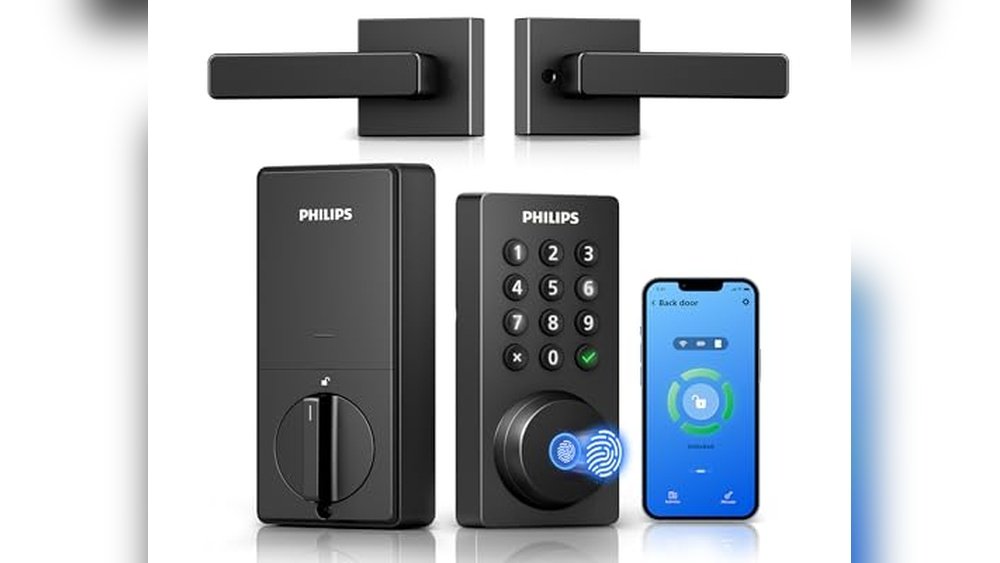
Smart locks have become a practical part of everyday life. They help you come and go without searching for keys.
Many people want a budget smart lock to keep their home secure and make access easier. But choosing one isn’t simple. There are different types, from door deadbolts to padlocks for lockers. Some are made for families or landlords, while others fit offices or rental units.
Features like fingerprint unlock, app control, or WiFi sound helpful, but can be confusing. You might worry about installation, battery life, or whether it works with your existing door. Budget options sometimes mean giving up advanced features, or settling for fewer access methods.
Premium models usually cost more, but may offer extra security or convenience. It’s hard to know which trade-offs matter most for you.
This article will help you decide which budget smart lock suits your needs without stress.
Below, you’ll find a range of smart locks with different features, designs, and intended uses. Each option addresses a specific need, so you can compare and choose based on what matters most to your situation.
Philips Wifi Keypad Door Lock
The Best Budget Smart Lock for homeowners or renters who want an easy, keyless way to secure and control their front door remotely.

The Philips WiFi Keypad Door Lock is a smart deadbolt that replaces your traditional lock and lets you enter your home with a PIN, fingerprint, or even your phone—no key needed. It solves the hassle of lost keys and lets you control access from anywhere with built-in WiFi and app support, so you can lock or unlock your door remotely without an extra hub.
In daily use, the lock feels seamless and reliable: unlock in just 0.3 seconds with your fingerprint or assign custom codes for guests and family. The freedom to check your door status, get alerts, and manage entry through the app gives peace of mind, whether you’re at work, traveling, or just want to avoid digging for keys.
- What stands out:
- Direct WiFi connection—no extra hub or hardware required
- Supports Alexa and Google Assistant for voice control
- Ultra-fast fingerprint unlocking for quick entry
- Customizable PIN codes for guests, recurring access, or one-time use
- Matte black finish fits modern doors (dimensions: 2.2″ x 6″ x 1.5″)
- Possible limitations:
- Requires a 2.4GHz WiFi network (not compatible with 5GHz only)
- Some advanced features need using the Philips Home Access App
Is This Smart Lock Right For You?
If you want a truly keyless, budget-friendly way to secure your home and easily manage entry for family or guests, this Philips smart lock is a reliable choice. It’s especially practical for those who don’t want extra hubs or bridges cluttering their WiFi setup.
Anyone who values quick fingerprint access or remote locking will appreciate the convenience and confidence this lock brings.
If you don’t have a 2.4GHz WiFi network or prefer traditional locks, it may not be the best fit. But for most modern households, it takes the stress out of managing keys and codes. A practical tip: set up different PINs for regular visitors and one-time guests for full control. Rest assured, setting up and using this lock is straightforward—even if you’re not a tech expert.
Philips Wi-fi Keyless Smart Lock
The Best Budget Smart Lock for families and renters who want a reliable, flexible way to secure their front door without breaking the bank.

This Philips Wi-Fi Keyless Smart Lock is a deadbolt designed for the modern home, offering multiple ways to unlock your door—app, passcode, fingerprint, physical key, or voice. It solves the hassle of forgotten keys and awkward lockouts with its built-in Wi-Fi for true remote control, so you can manage access from anywhere without extra hubs.
Day-to-day, this lock feels like a genuine upgrade: it’s easy to set up and even easier to use, whether you’re letting guests in with a code, unlocking with your fingerprint on a busy morning, or using voice commands when your hands are full. The ability to create up to 100 custom codes means everyone in the household (or even your Airbnb guests) can get in securely, while auto-locking adds an extra layer of peace of mind.
- What Stands Out:
- Five unlocking options for flexible access
- Remote locking/unlocking via built-in Wi-Fi
- Works with Alexa and Google Assistant
- Stores multiple fingerprints for the whole family
- Create and share up to 100 passcodes
- Limitations:
- Batteries not included—purchase separately
- Only supports 2.4GHz Wi-Fi networks
- Keep lock within 65ft of router for best remote performance
Is This The Right Smart Lock For You?
If you want the Best Budget Smart Lock that combines flexibility and ease of use, this Philips model is an excellent pick—especially for households with many users, frequent guests, or those who manage rentals. It’s also ideal for anyone who values being able to grant access remotely, without extra hubs or subscription fees.
However, if your home only has 5GHz Wi-Fi or you dislike changing batteries, you might want to consider alternatives. For most, though, the ability to ditch keys and manage the door via app, fingerprint, or voice removes a lot of stress.
Just remember to have a set of batteries ready before installation, and you’ll enjoy a smoother, smarter entry experience from day one.
Yamiry Keyless Smart Door Lock
A Best Budget Smart Lock for renters, homeowners, or anyone seeking reliable, keyless entry without overspending.

The Yamiry Keyless Smart Door Lock is a simple but secure upgrade for any front door, offering a combination of keypad, fingerprint, and app-based access. Designed for straightforward installation, it solves the hassle of lost keys and lets you manage entry codes for family or guests with ease.
In everyday use, the lock feels reassuringly solid thanks to its aluminum build, and the option to control everything from your phone means you don’t have to juggle keys or worry about getting locked out. Even for those who aren’t tech-savvy, setup is quick, and the lock integrates smoothly with most American standard doors.
- Strengths:
- Multiple unlock methods: app, code, fingerprint, fob, or key
- Stores up to 50 fingerprints and codes—great for families
- Sturdy, weather-resistant aluminum construction
- Auto-lock feature for added peace of mind
- Lifetime after-sales support and a 1-year warranty
- Limitations:
- Remote control requires an additional Wi-Fi gateway (sold separately)
- Limited to Bluetooth range unless gateway is added
Is This The Right Lock For You?
If you want dependable security and flexible access without breaking the bank, this Yamiry model is a solid fit—especially for families, roommates, or Airbnb hosts needing to juggle multiple codes and quick reprogramming. Skip it if you need built-in Wi-Fi or want full smart home integration right out of the box. For most, though, this lock takes away daily worries about lost keys or accidental lockouts, and the auto-lock function is a subtle but welcome stress reliever. A practical tip: store a backup mechanical key somewhere safe, just in case your phone battery dies. Rest easy knowing support and warranty coverage are there if you need help down the road.
Eufy Security C220 Fingerprint Smart Lock
The Best Budget Smart Lock for renters, homeowners, or anyone seeking reliable, keyless entry without breaking the bank.

The eufy Security C220 offers a straightforward solution for anyone tired of fumbling for keys or worrying about lost copies. With fingerprint recognition powered by self-learning AI, unlocking your door is fast and accurate, making it ideal for busy households or anyone who values convenience.
Installation is simple—no drilling or complicated tools required. Daily use feels effortless, whether you unlock with your finger, the app, keypad, or even your voice. Knowing it’s reliable in harsh weather and sends alerts if tampered with brings real peace of mind.
- Strengths:
- 8 months battery life for low-maintenance use
- Multiple unlocking options (fingerprint, app, keypad, key, Apple Watch, voice)
- Quick, easy installation on standard deadbolts
- Built-in Wi-Fi for remote access, no extra hub needed
- Weather-resistant and sends security alerts
- Limitations:
- Requires 8 AA batteries (not rechargeable)
- Limited to BHMA Grade 3 security
- May not fit highly custom doors
Is This The Right Lock For You?
If you want a dependable smart lock that doesn’t require technical know-how or a big investment, the C220 is a strong choice. It’s well-suited for apartments, family homes, or anyone who values quick entry and remote control. If you prefer rechargeable batteries or need higher-grade security, you may want to look elsewhere.
This lock saves time and worry—no more searching for keys or wondering if you locked the door. For best results, keep spare AA batteries on hand and take advantage of the app’s access management. You can feel confident knowing your front door is secure and easy to access, even when your hands are full.
Veise Wifi Fingerprint Keyless Deadbolt
The Best Budget Smart Lock for homeowners and renters seeking modern security without overspending.

The Veise WiFi Fingerprint Keyless Deadbolt is a versatile smart lock designed to make front door security effortless and adaptable. It tackles the hassle of lost keys and manual entry codes by offering six convenient ways to unlock, including app control, fingerprint, PINs, physical keys, and voice commands.
Built-in WiFi means you don’t need a hub—just connect and manage your lock from anywhere.
In day-to-day use, the fingerprint sensor is quick and reliable, recognizing you in a fraction of a second. Setting up custom codes or granting access to guests is straightforward through the app. The integration with Alexa and Google Assistant adds a layer of convenience, letting you lock or unlock the door hands-free.
The lock feels sturdy, and the matte black finish fits well with most entryways.
- Strengths:
- Six entry methods: app, fingerprint, codes, keys, voice control
- Fast fingerprint recognition (0.2 seconds)
- Remote management with built-in WiFi (no hub needed)
- Anti-peeping password protection
- Compatible with Alexa & Google Assistant
- Compact, sleek matte black design
- Limitations:
- Requires 2.4GHz WiFi; not compatible with 5GHz
- No advanced smart home integrations beyond voice assistants
Is It Right For You?
If you want a smart lock that blends modern security with budget-friendly simplicity, the Veise WiFi Fingerprint Keyless Deadbolt is an easy choice. It’s especially helpful for busy families, Airbnb hosts, or anyone who needs to grant access without complicated setup.
The app’s remote features take away the stress of wondering if you locked the door, and the fingerprint sensor means you never fumble for keys.
However, if you need deep smart home integration or use 5GHz WiFi exclusively, you might want to look elsewhere. For most users, this lock removes confusion about access, provides peace of mind, and is straightforward to install. Tip: Take a few minutes to register family fingerprints and set up guest codes—after that, it’s nearly hands-off.
Rest assured, the Veise lock offers reliable performance and multiple backup options, so you’re covered even if one method fails. It’s a practical upgrade that makes your front door smarter without complicating your life.
Veise Fingerprint & App Smart Door Lock
The Best Budget Smart Lock for homeowners, renters, or property managers who want secure, flexible entry without breaking the bank.

The Veise Fingerprint & App Smart Door Lock delivers robust, modern security in a familiar deadbolt form, perfect for anyone looking for a blend of convenience and peace of mind. Its standout feature is 8-in-1 keyless entry, including fingerprint, app control, codes, fob cards, and even voice assistant compatibility (with a gateway), so you’re never locked out if you forget your phone or keys.
In daily life, this lock’s fast fingerprint recognition and flexible access options make coming home or managing guests refreshingly simple. You’ll appreciate being able to generate one-time or recurring codes for visitors, check entry logs on your phone, and have the door auto-lock behind you.
There’s a reassuring feeling knowing you can manage access anytime, even from afar.
- Why it stands out:
- Potential drawbacks:
Is This Smart Lock Right For You?
If you want affordable, comprehensive smart access for your home or rental, the Veise Fingerprint & App Smart Door Lock covers all the essentials without the premium price. It’s an excellent pick for anyone who values flexibility—like families, Airbnb hosts, or roommates—who need to share and manage entry easily.
The clear activity logs and local storage mean you stay in control of your security data.
If you’re set on full home automation or advanced integrations out of the box, you’ll want to purchase the extra gateway. Otherwise, most will find setup straightforward, and the system is forgiving if you ever need to reset or add users. My tip: enroll all family fingerprints and test codes before mounting for a smoother experience. Rest easy knowing your entry is always logged and your lock can’t be hacked from the cloud.
Veise Wifi Fingerprint Smart Lock
This Best Budget Smart Lock is perfect for homeowners or renters seeking an affordable, all-in-one keyless entry solution with remote access and voice control.

The Veise WiFi Fingerprint Smart Lock is a complete deadbolt set designed for easy, keyless entry on front doors. It directly connects to your home WiFi without needing an extra hub, eliminating setup headaches and saving money compared to Bluetooth or hub-based locks.
Its standout feature is the ultra-fast fingerprint reader with 99. 99% accuracy, making access simple for the entire family.
Day-to-day, this lock lets you unlock your door using the app, fingerprint, passcodes, voice commands, or even a physical key if needed. Remote access means you can check status, manage codes, or let guests in from anywhere. The auto-lock function adds peace of mind, so you never have to worry if you forgot to secure your door.
- Strengths:
- Direct WiFi connection—no hubs or bridges required
- Multiple unlock methods: app, fingerprint, passcodes, voice, IC card, key
- Works with Alexa and Google Assistant
- Auto-lock timer (0–180 seconds) for extra security
- Remote access management and detailed access logs
- Stores up to 20 fingerprints
- Limitations:
- Only compatible with 2.4GHz WiFi (not 5GHz)
- No mention of weatherproofing for extreme outdoor conditions
Who This Lock Is For
If you want an affordable smart lock that doesn’t require extra hubs or complex wiring, the Veise WiFi Fingerprint Smart Lock is a practical pick. It’s ideal for busy households, short-term rental hosts, or anyone who needs to manage entry remotely—without breaking the bank.
The easy fingerprint access and app control mean less fumbling for keys or worrying about who has the latest code.
Those in areas with only 5GHz WiFi or who need a lock for harsh outdoor environments might want to check compatibility first. For most front doors, though, installation is straightforward, and the auto-lock feature offers daily peace of mind. A simple tip: register family fingerprints right away and set your preferred auto-lock time in the app for best results. Rest easy knowing you can always check or control your door, wherever you are.
Schlage Encode Smart Wi-fi Deadbolt Lock
The Best Budget Smart Lock for homeowners or Airbnb hosts who want secure, keyless entry and remote access without breaking the bank.

The Schlage Encode Smart Wi-Fi Deadbolt Lock is a feature-rich smart lock designed for those who want robust security and flexible access without ongoing subscription costs. With built-in Wi-Fi, you can control your door from anywhere via the Schlage Home app, making it perfect for remote management or sharing access with guests and family.
Day-to-day, this lock feels solid and reliable—installation is straightforward, and the responsive touchscreen keypad means no more fumbling for keys. Whether you’re managing multiple codes for guests or just want peace of mind checking your door status remotely, it’s a system that saves time and reduces stress.
- Why it stands out:
- Supports up to 100 user codes—great for Airbnb or large households
- Works with Alexa and Google Home for hands-free locking
- Advanced security features: encrypted connection, built-in alarm, and fingerprint-resistant touchscreen
- Installs in minutes with just a screwdriver—no wiring needed
- Consider:
- Requires a 2.4GHz Wi-Fi network for setup
- Bulkier than traditional deadbolts due to smart features
Is This The Right Choice For You?
If you want a smart lock that’s easy to set up, lets you manage access codes for family or guests, and integrates with smart home assistants, the Schlage Encode is an excellent fit. It’s ideal for anyone tired of spare keys or worried about locking up while away from home.
Frequent travelers, Airbnb hosts, and busy families will appreciate the flexibility and remote control.
Those looking for a slim, ultra-minimalist lock or who don’t have Wi-Fi at home may want to consider other options. For most households, though, this lock removes the stress of lost keys and forgotten codes, and you can always check your door’s status for extra reassurance. Pro tip: Set up access codes for trusted visitors in advance so you’re never caught off guard.
Elinksmart Fingerprint Padlock
The Best Budget Smart Lock for gym lockers, storage units, or outdoor gates—ideal for anyone seeking simple, keyless security without overspending.

The eLinkSmart Fingerprint Padlock is a compact, weatherproof smart lock that replaces traditional keys and combinations with instant fingerprint access. It’s made for people who want reliable security without the hassle of remembering codes or carrying keys. The standout feature is its advanced fingerprint reader, unlocking in just 0.
2 seconds—making it faster and more convenient than most budget options.
In everyday use, the lock feels effortless. You simply touch your finger to unlock, and with the Bluetooth app, you can manage permissions or check unlock history. Its sturdy build and long battery life mean you won’t worry about frequent charging or vulnerability to weather, giving peace of mind whether it’s on a locker, fence, or storage unit.
- Strengths:
- Rapid fingerprint unlocking
- App control for sharing access
- Weatherproof and durable
- Long-lasting rechargeable battery
- Pick-resistant and keyless
- Limitations:
- Bluetooth range is limited to nearby devices
- App required for full access management
- Medium size may not fit some specialty lockers
Is This Smart Lock Right For You?
If you want a budget-friendly smart lock for gyms, pool sheds, or outdoor storage, this is a solid choice. It’s especially helpful if you tend to lose keys or forget codes, and the quick unlock means you won’t waste time fiddling with locks.
However, if you need remote unlocking from far away or require integration with a larger smart home system, you might want a more advanced model.
This lock removes everyday stress about security and access—once set up, you can share permissions and never worry about losing a key again. For best reliability, keep the battery charged and use the app to monitor usage. The warranty and support offer extra reassurance if you run into any issues.
Foxgard Biometric Door Lock
The Best Budget Smart Lock for renters, bedroom privacy seekers, or anyone wanting secure, keyless entry without overspending.

The Foxgard Biometric Door Lock is a versatile smart lock designed for indoor use, offering five ways to unlock: fingerprint, keypad code, app control, IC card, and mechanical key. It’s a practical solution for anyone who wants to upgrade their bedroom, office, or rental property with modern, keyless security—without complex installation or high costs. One standout feature is the anti-peep keypad, which lets you enter random digits around your code for added privacy.
Day-to-day, this lock feels intuitive and reliable. Managing access for guests or roommates is easy with the app, and the auto-lock function provides peace of mind when you’re rushing out. Installation is straightforward, requiring only a screwdriver. If you value convenience and privacy, this smart lock can genuinely make your routine smoother.
- Strengths: Multiple unlock methods, privacy deadlock, quick installation, long battery life, and secure keypad with anti-peep technology.
- Limitations: Only suitable for indoor doors; Foxgard Gateway for remote control is sold separately.
Should You Choose Foxgard?
This lock is best for people who want simple, affordable smart security for bedrooms, offices, or rentals. If you don’t need outdoor durability or full home automation, it covers all practical needs: safety, guest access, and privacy. Those needing remote access should factor in the extra gateway purchase.
If you struggle with lost keys or want to quickly manage who enters your space, Foxgard reduces that stress. For best results, keep spare batteries handy and set up app notifications for low battery alerts. And if you’re worried about installation, rest easy—no wiring or drilling required, just a screwdriver and a few minutes of your time.
How To Weigh Your Options For Smart Locks
Start by considering how you plan to unlock your door most of the time. Decide if remote access, voice control, or local-only features match your comfort level. Think about who will use the lock—children, renters, or guests—and whether flexibility or simplicity matters more.
Assess your ability to troubleshoot WiFi or app issues, since not all smart locks are equally intuitive. The right balance depends on your home’s needs and your tolerance for technology quirks.
Common Missteps And Who Should Rethink Smart Locks
- Expecting perfect reliability without regular battery changes or app updates.
- Not wanting to use a smartphone or manage codes may lead to frustration.
- If you are uncomfortable with app permissions or cloud features, these products may not feel secure to you.
- Assuming all locks fit every door type without checking measurements.
- Needing absolute privacy or zero digital footprint—these may not be for you.
Best Budget Smart Lock: Buyer Questions Answered
Can I Install A Smart Lock Myself Without Special Tools?
Most smart locks are designed for DIY installation with basic tools. However, always check the specific door measurements and follow the manual to avoid issues.
Do I Need Wifi For A Smart Lock To Work?
Some features, like remote access or voice control, require WiFi. For basic locking and unlocking, Bluetooth or keypad models can work without WiFi.
What Happens If The Battery Dies On My Smart Lock?
Most smart locks have a backup key or emergency power option. You should replace batteries before they run out, but there is usually a way to get in if you forget.
Are Smart Locks Safe To Use For Rental Properties?
They can be useful for managing guest access. Still, make sure you can easily reset codes or permissions between guests to maintain security.
Will Smart Locks Work During Power Or Internet Outages?
Battery-powered locks generally continue working for local access. Remote features will not work without internet, but keypads or physical keys provide backup.
How Private Is My Data When Using Smart Lock Apps?
Privacy depends on the brand and app settings. Review app permissions and privacy policies to understand where your data goes.
Is A Smart Lock A Good Idea For Interior Doors?
Some models are designed for interior use and offer privacy features. Assess if you need remote access or just simple keyless entry for inside doors.
Settling On The Right Smart Lock For Your Home
Choosing a budget smart lock is about your comfort with technology and how much control you want over access. Each model serves different lifestyles and levels of tech involvement, so there is no single perfect answer.
Take your time, trust your sense of what fits your routine, and don’t worry if some features go unused. A calm, well-matched choice will serve you better than chasing every possible function.